



How do I turn off email notifications from myLexia?
How do I turn off email notifications from myLexia?
Overview
To support the implementation of Lexia® student programs, Lexia sends emails to staff who have new accounts created in myLexia®. After their accounts are created, staff will receive orientation/engagement emails that provide information on how to get started in myLexia.
This article explains how to turn off orientation/engagement emails from myLexia.
If you're an administrator and would like to turn off email notifications for all staff, see How can administrators turn off email notifications for all staff?
Applies to: Educators and administrators who have Teacher, School Admin, or District Admin access to myLexia®.
How do I opt out of email notifications from myLexia?
You can opt out of orientation/engagement emails in your myLexia profile.
-
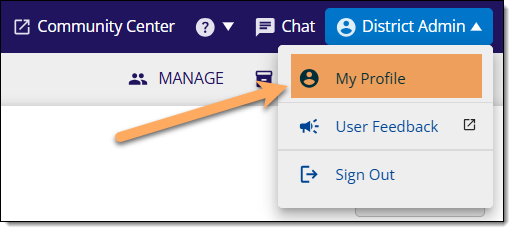
In myLexia, select your name and then select My Profile from the dropdown menu.
-
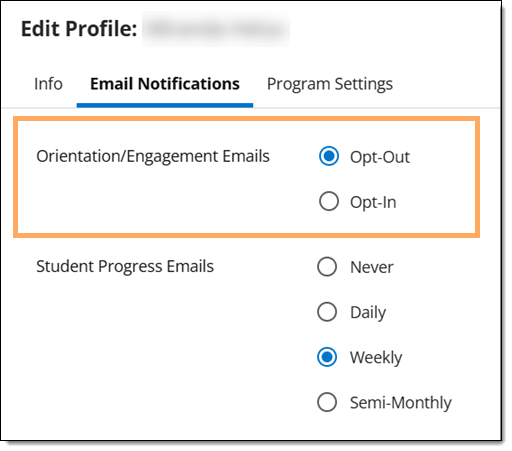
In the Edit Profile window, select the Email Notifications tab.
If you cannot see the tab, a district administrator has disabled email notifications for your site. See Troubleshooting myLexia Email Notifications for more information.
-
For Orientation/Engagement emails, the Opt-In option is selected by default. Select Opt-Out to disable orientation email notifications.
-
Select Save.