




How do I enable a unit that was disabled with Content Controls?
Overview
The Content Controls site setting allows a myLexia District Admin to disable program units for all students in the account. This feature is currently available for Core5 only.
For more information on the content controls feature, see myLexia Settings: Content Controls.
Applies to: Educators and Administrators who have myLexia District Admin access, and some Educators and Administrators who have School Admin access to myLexia.
How do I enable a unit that is currently disabled with Content Controls?
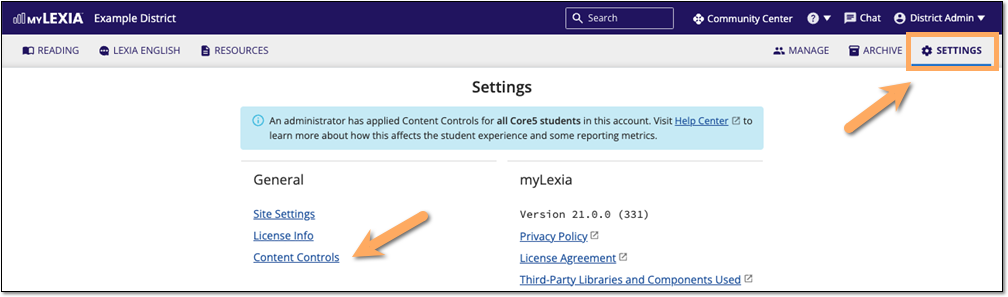
In myLexia, Select Settings, then select Content Controls from the list of settings.
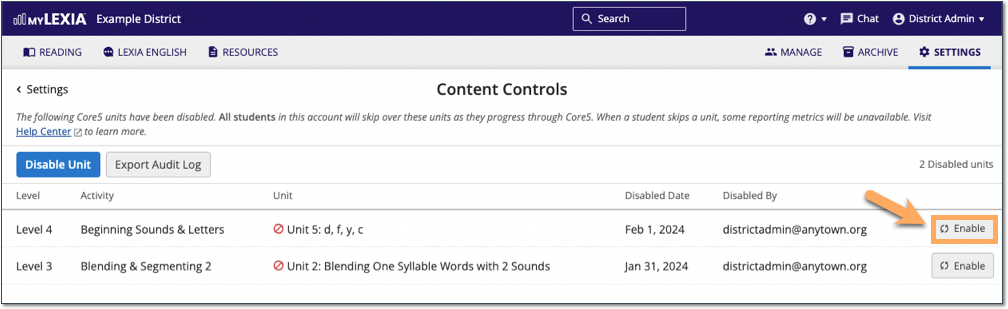
Locate the unit you would like to enable from the list, and select Enable.
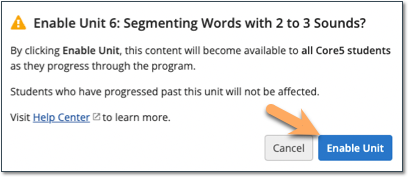
In the dialog box, select Enable Unit. The content in this unit will become available to all Core5 students.
The Content Controls page will briefly show a confirmation that the unit is enabled, and the unit will be removed from the list of disabled units displayed on this page.