

Change your myLexia Account Details
Change your myLexia Account Details
Applies to: Educators and administrators who have Teacher, School Admin, or District Admin access to myLexia®.
If you would like to change your assigned user role (e.g., from Teacher to Administrator), or change the school you are assigned to in myLexia®, contact a myLexia administrator in your school or district.
If you are an administrator who would like to change account information for another user, see For Admins: Edit Staff Accounts.
How do I change my myLexia account settings?
Account settings you can change in My Profile include your username, password, and email notification settings.
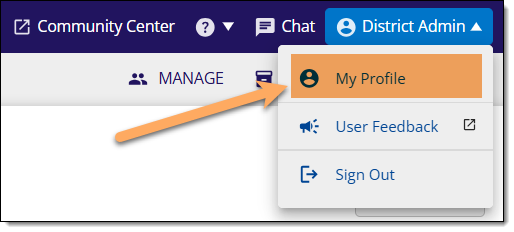
After logging in to myLexia, hover over your name and select My Profile.
Select Info to make changes to your name, username, or password.
Select Email Notifications to update your email notification settings:
You may opt in or out of Orientation emails, which are sent out to users after they have created their myLexia accounts.
You may also change the frequency of Student Progress emails. These emails alert you to new student achievements or students who have been flagged as Need Instruction in your assigned Lexia® Core5® Reading classes.
To save your changes, select Save.
Help, I can’t change my account information!
Some schools and districts use automated tools to sync staff accounts in myLexia with their Student Information System (SIS). If your school or district uses automated rostering, you will not be able to edit some aspects of your account information.
Any information that you aren’t able to change (e.g., your name or username) will be highlighted in gray. If you are not sure whether your school or district uses automated tools for rostering, check with a myLexia administrator in your school or district.