

For LETRS Course Managers: How do I view which participants are eligible for LETRS Coaching?
For LETRS Course Managers: How do I view which participants are eligible for LETRS Coaching?
Overview
LETRS Coaching supports educators who have completed LETRS Volume 1 or 2 in translating theory into practice by focusing on classroom applications of LETRS principles. Educators receive either a half school year or full school year of support from a LETRS coach to work through goal-focused coaching cycles, including one-to-one live online coaching sessions and ongoing asynchronous feedback and reflection.
For more detailed information on LETRS Coaching eligibility, see Who is eligible for LETRS Coaching?
This article explains how course managers can see which LETRS participants are eligible for LETRS Coaching on the online platform.
Applies to: Course managers with Owner, License Manager, Cohort Manager, or View Only permission for Lexia® LETRS®.
How do I view which participants are eligible for LETRS Coaching?
There are two options for LETRS Coaching:
-
LETRS Coaching for LETRS graduates: A full school year of coaching for LETRS participants who have completed Units 1-8 of LETRS.
-
LETRS Coaching for Volume 1: A half school year of coaching for LETRS participants who have completed Units 1-4 (including the posttest) and have not yet completed Unit 8.
Eligible educators who have completed LETRS Volume 1 or 2 must be actively and directly involved in the delivery of literacy instruction to students.
The steps below explain how to find eligible participants for each version of LETRS Coaching.
LETRS Coaching for LETRS graduates
LETRS participants who have completed all eight Units are eligible for LETRS Coaching for LETRS graduates. To view participants in your implementation who have completed all Units:
-
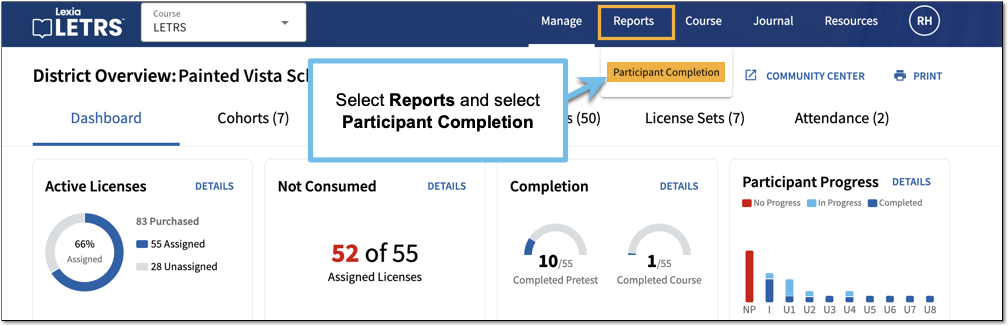
Log in to LETRS and select Reports.
-
Select Participant Completion from the dropdown menu.
-
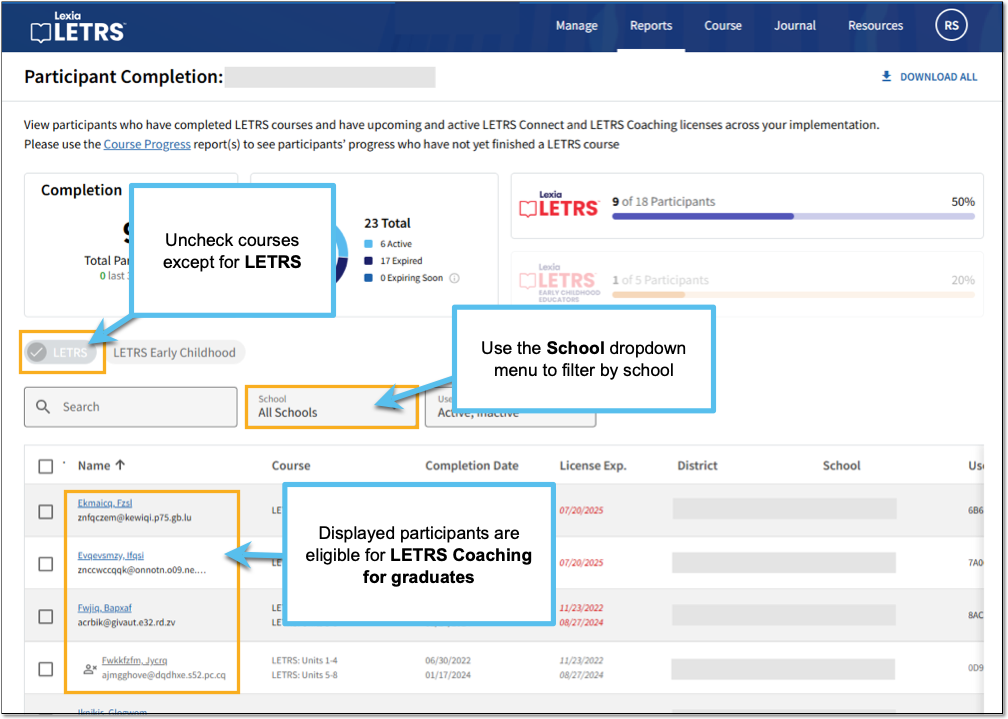
On the Participant Completion report page, unselect all courses except for LETRS.
-
The report will display graduates of the LETRS course. These educators can be enrolled in LETRS Coaching for LETRS graduates.
Use the School dropdown menu to filter eligible educators by school.
LETRS Coaching for Volume 1
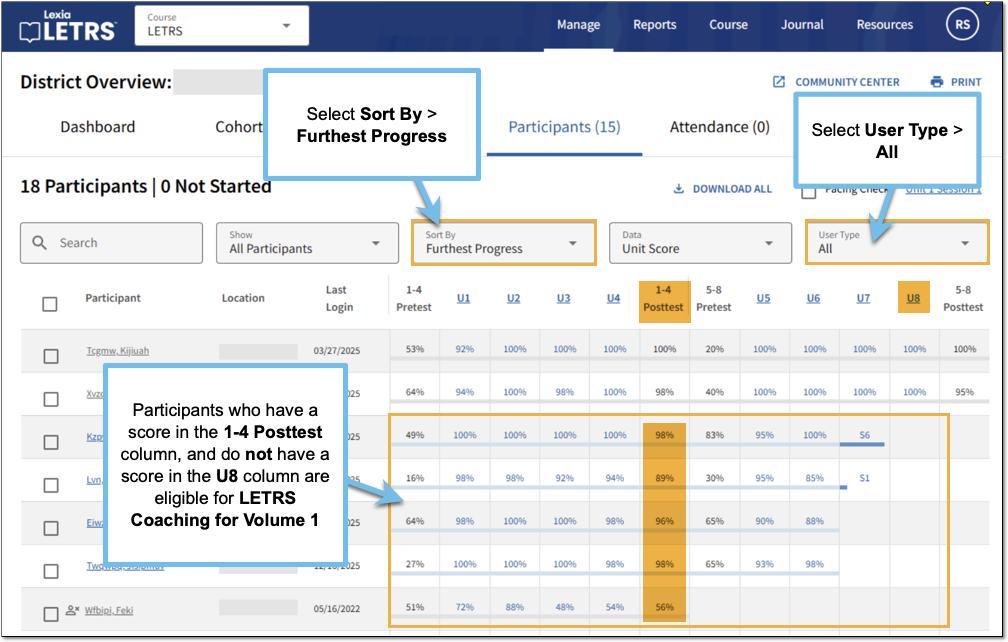
LETRS participants who have completed the Units 1-4 Posttest, but have not yet completed Unit 8, can be enrolled in LETRS Coaching for Volume 1. To view participants in your implementation who have completed Units 1-4:
-
Log in to LETRS and select the Course dropdown menu. Select LETRS.
-
If you are not currently on the Overview page, select the Manage menu and select Overview.
To view a specific school's overview, select the Schools tab and select the name of the school.
-
On the Overview page, select the Participants tab to view the Participant Progress Report.
-
Select User Type and select All.
-
Select the Sort By dropdown menu and select Furthest Progress. The participants who have made the furthest progress in the course will be displayed at the top of the table.
-
Scroll down to see if there are any participants who have a score in the 1-4 Posttest column and do not have a score in the U8 (Unit 8) column.
Educators who meet both of these criteria can be enrolled in LETRS Coaching for Volume 1.
Use the arrows at the bottom of the table to navigate between pages, or use the Items per page option to change the number of participants displayed per page.