




How Can I Tell if a Staff Account is an Exception Account in myLexia?
Knowing if an account is syncing automatically or is an exception may help you troubleshoot issues with a staff account. Check your nightly automated import summary, log file, or the RefID field in myLexia to identify exception accounts.
Nightly Automated Import Summary
If you receive a nightly automated import summary email from Lexia, a list of exception staff is included in every nightly summary.
Schools or districts managed through ClassLink do not receive an import summary email. If your school or district automates staff information through ClassLink, check your logs or the RefID field in myLexia to identify staff exception accounts.
Log file
Clever: The User-Summary log at files.myLexia.com lists staff who have exception accounts in the Notices section of the log. See Access Your Error Logs: For Clever-Managed Sites.
ClassLink: In your log file, under the users.csv section, there will be a "Duplicate 'Username' value" error for exception staff. See Access Your Error Logs: For ClassLink-Managed Sites.
Check the RefID field in the Edit → Staff window in myLexia
In myLexia, select Manage, and then Staff.
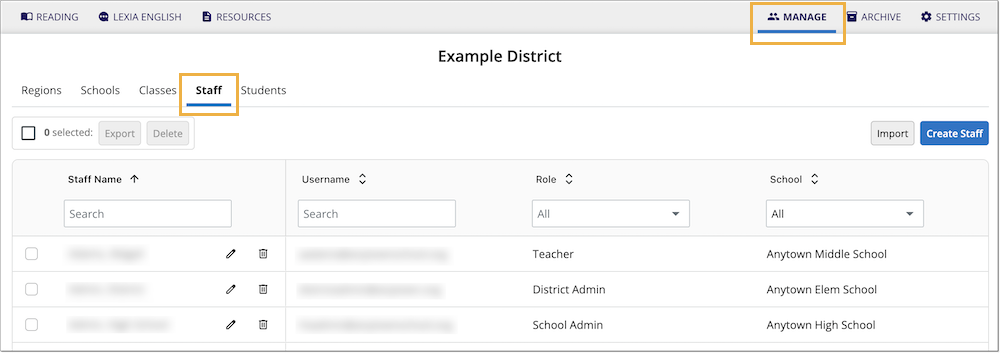
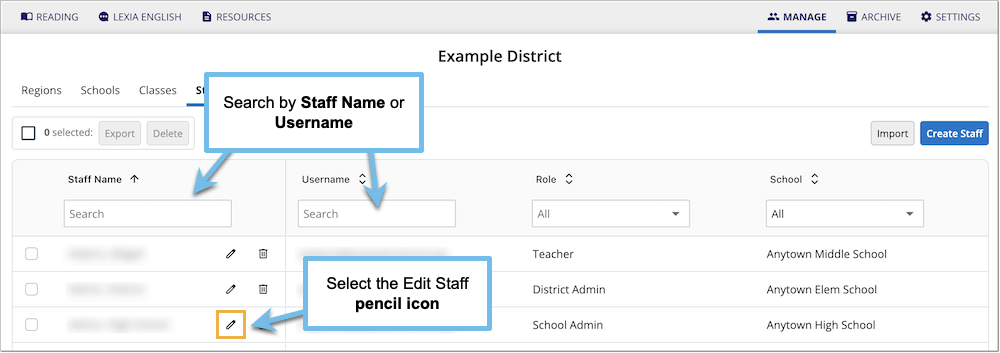
Use the search box to find a staff member.
Select the Pencil icon to view the Edit Staff window.
In the Edit Staff window, check the RefID field. If the RefID starts with EX, it is an exception account.

Exception RefID
If the RefID does not start with EX, and yet the staff member is not syncing, contact Lexia Support for assistance.