


Lexia English Parent Reports
Lexia English Parent Reports
Overview
This article explains how to generate parent reports for your Lexia English students.
Applies to: Educators who have myLexia® accounts, and whose students use Lexia English Language Development™
Where do I find Lexia English Parent Reports?
Print and/or download parent reports from a Lexia English class overview.
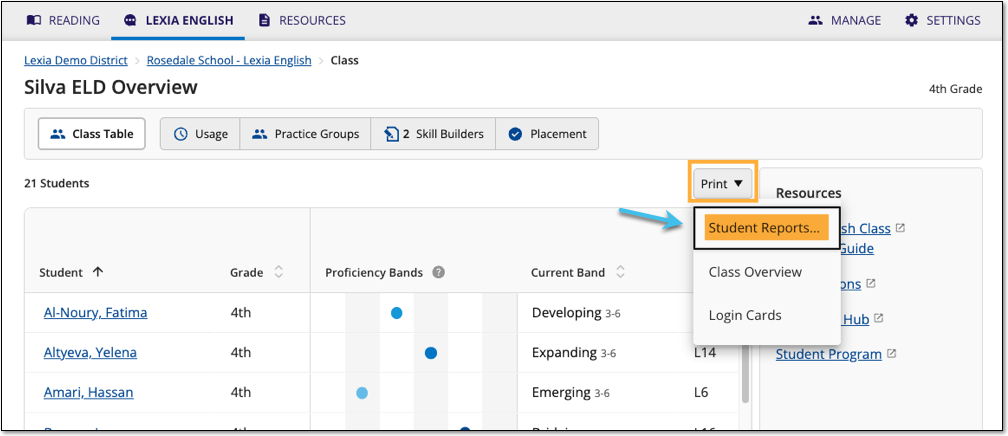
In myLexia, select Lexia English at the top of the page.
If you have Administrator access, select a class. If you have Teacher access, you will see your assigned class.
Teachers: If you have multiple classes, select the name of the class at the top of your Class Overview to switch between classes.
Hover over the Print button and select Student Reports from the dropdown menu.
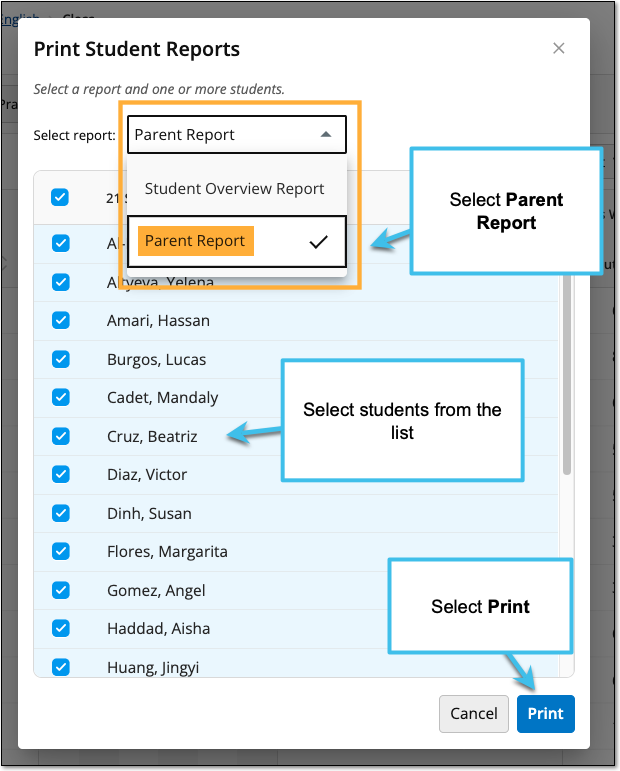
In the Print Student Reports window, next to Select report, select Parent Report.
Select students in the list (all students in the class are selected by default).
Select Print.
The reports will generate, which may take a few minutes. When the reports are ready, select View Reports. Use your browser’s Download or Print function to download or print the reports.