

Where do I Find Student Skill Check Data for PowerUp?
Overview
Skill Checks are curriculum-embedded assessments that check student understanding at strategic points in Lexia® PowerUp Literacy®. Skill Checks are designed to be brief, and are closely tied to the curriculum.
This article describes how to locate Skill Check data in the PowerUp Student Skills Report.
Applies to: Educators and administrators who have Teacher, School Admin, or District Admin access to myLexia®.
View Skill Check data in the Student Skills Report
-
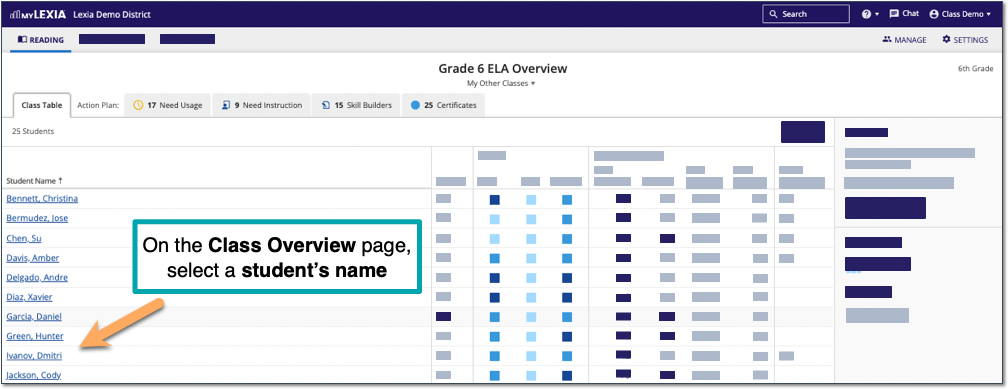
From your PowerUp Class Overview, select the name of a student to view their Student Overview page.
-
On the Student Overview page, select Skills Report.

-
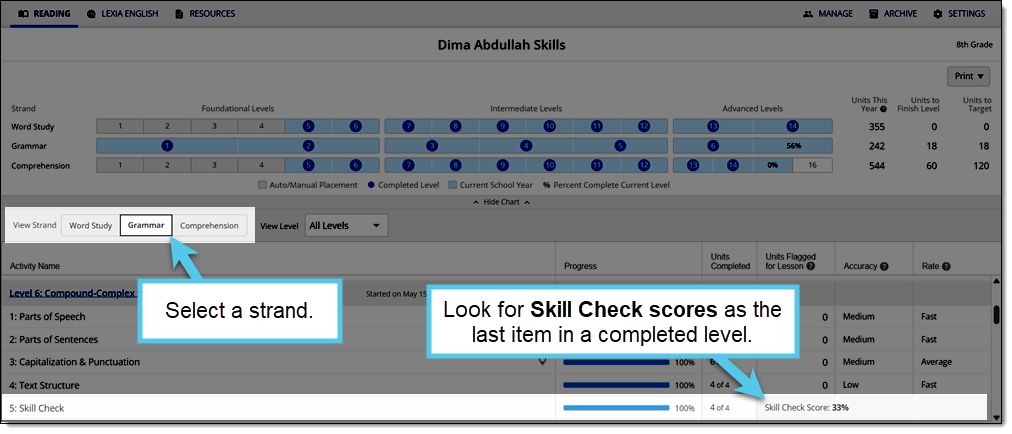
The PowerUp Student Skills Report displays.
The PowerUp Student Skills Report provides a summary of a student’s progress and detailed performance data (including activity-level accuracy and rate) across school years. For more details about this report, see the myLexia Index of PowerUp Reports, available on the PowerUp Resources Hub.
-
Choose a Strand. In levels with Skill Checks, Skill Check scores appear at the end of the completed level's activities.