

myLexia Reports: PowerUp District Overview
myLexia Reports: PowerUp District Overview
Overview
This article explains where to find the Lexia® PowerUp Literacy® District Overview report and what information is included in the report.
Applies to: Educators and administrators who have District Admin access to myLexia®.
What is the PowerUp District Overview report in myLexia?
The PowerUp District Overview report displays data on your district's usage and progress in PowerUp.
The District Overview report will help you answer the following questions:
What is my district's usage?
What is my district's profile of skills?
How often are educators in my district accessing myLexia to view reports?
What information is included in the PowerUp District Overview report?
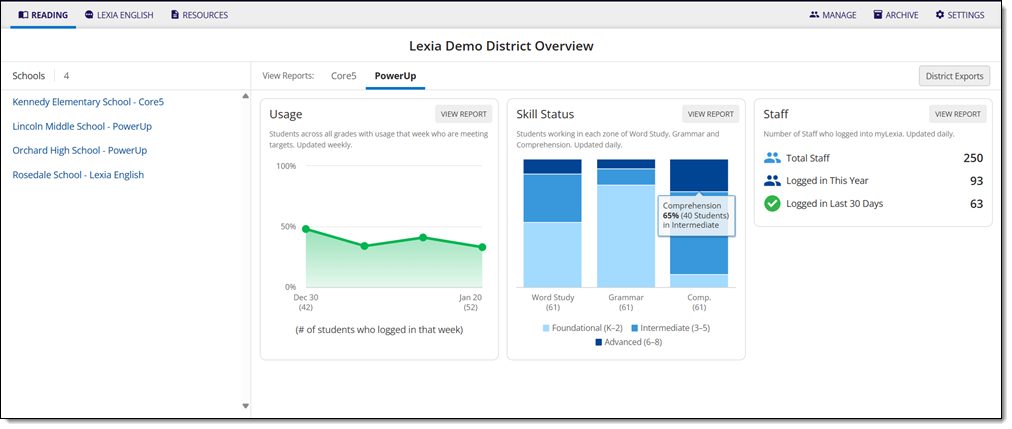
The PowerUp District Overview report contains the following information:
Usage: Displays the number and percentage of students in the district who met their recommended weekly usage targets.
Skill Status: Displays the number and percentage of students in the district who are currently working in each of the three instructional zones (Foundational, Intermediate, Advanced) across the three instructional PowerUp strands (Word Study, Grammar, Comprehension).
Staff Usage: Displays the number of staff members in the district who logged in to myLexia in the past 30 days and during the current school year.
Select View Report in each District Overview card to view more details and print each individual report.
Where do I find the PowerUp District Overview report in myLexia?
To find the PowerUp District Overview report:
In myLexia, select the Reading tab to view your District Overview. Make sure the PowerUp tab is selected.
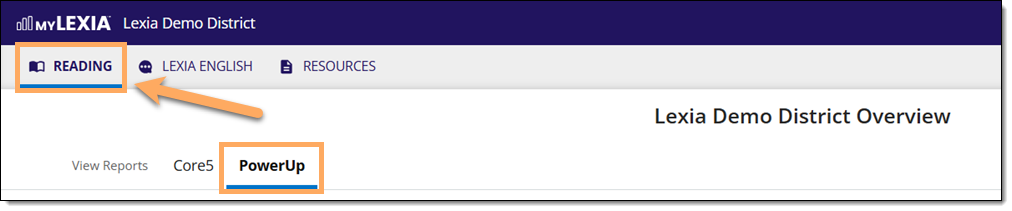
From here, explore the reports provided in each District Overview card.
Where can I learn more about the PowerUp District Overview?
The PowerUp District Overview Guide is a downloadable PDF that provides the following:
Overview and main purposes of the District Overview report
Information on the data included in the report
Suggestions on how to ensure your district is on track to meet instructional goals