

PowerUp Skill Builder library and answer keys
PowerUp Skill Builder library and answer keys
Overview
The entire library of Lexia® PowerUp Literacy® Skill Builders, including answer keys, is in the Lexia Skill Builder Library in myLexia.
This article describes how to access the entire library of Skill Builders, including answer keys.
Applies to: Educators and administrators whose students use Lexia® PowerUp Literacy®
Where do I find the entire library of Skill Builders and their answer keys for PowerUp?
Skill Builders and answer keys are available in both printable PDF and digital formats.
PDF Skill Builders
To find PDF versions of Skill Builders and answer keys, go to the Lexia Skill Builder Library in myLexia:
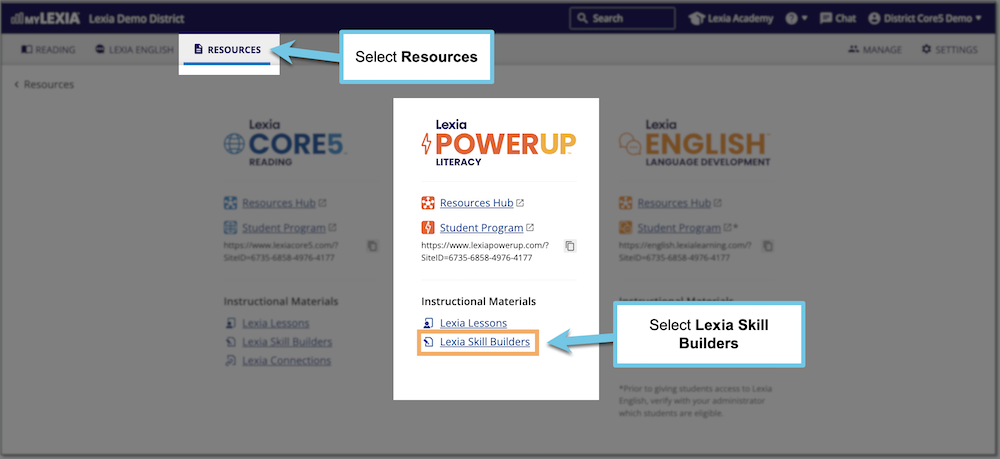
In myLexia, select Resources.
Under the PowerUp logo, select Lexia Skill Builders.
(Optional) Choose a Strand, Zone, or Level.
Select one or more Skill Builders from the list.
Select Open Skill Builders, Open Answer Keys, or Open Skill Builders with Answer Keys.
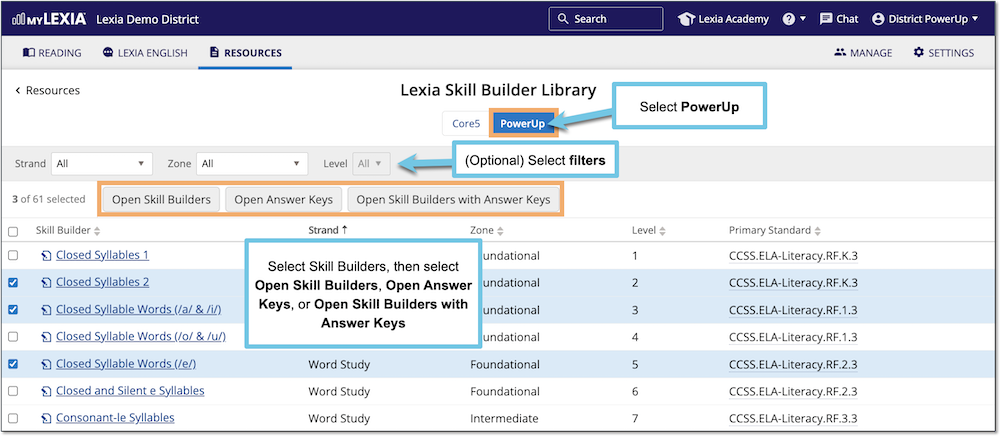
The selected Skill Builders or Answer Keys display in a pop-up window.
Use your browser's Print or Download options to print or download the Skill Builders or Answer Keys.
Digital Skill Builders
As an alternative to paper-based Skill Builders, create assignments for students through Google Classroom™ or an LMS with Digital Lexia Skill Builders.
Answer key sets are also available in digital format.
Digital Lexia Skill Builders and answer keys are in the PowerUp Resources Hub. See Digital Skill Builders for PowerUp.