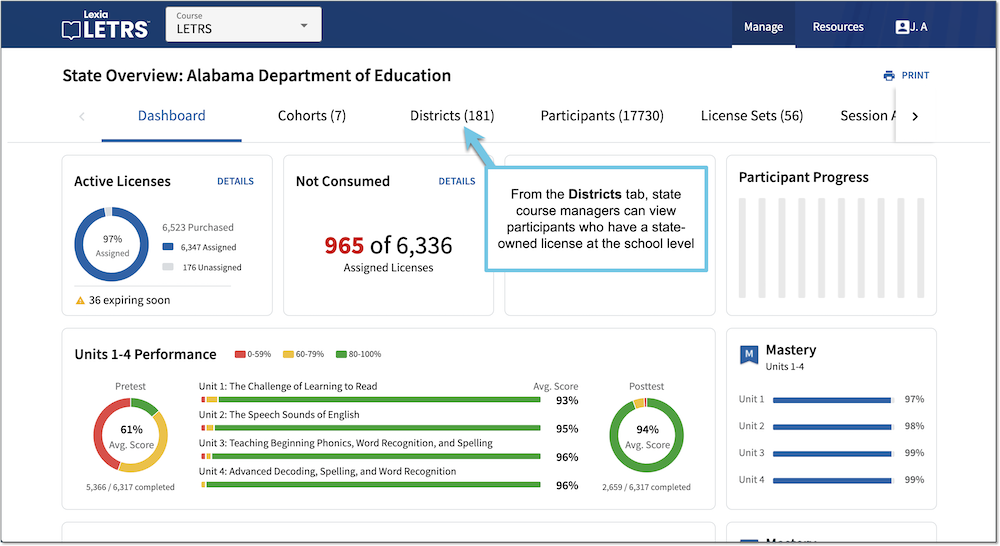
State Overview Page for LETRS Course Managers
State Overview Page for LETRS Course Managers
Overview
State course managers with any permission type have access to the State Overview page in Lexia® LETRS®, where they can use the tabs to view the implementation by Cohorts or Districts. From the Districts tab, state course managers can view participants with a state-owned license at the school-level.
This article describes the state overview page.
Applies to: Course managers with Owner, License Manager, Cohort Manager, or View Only permission for Lexia® LETRS®.
State Overview Page
State course managers can view:
State-level participant data
State-owned licenses
State course managers who have Owner or License Manager permissions can allocate state-owned licenses to the districts in the state.
On the Manage Licenses page, school and district course managers can see state-owned license sets and can assign those licenses. Each set shows the number of licenses that have been allocated to the school or district from the state.
Cohorts in the state
State course managers with Owner or Cohort Manager permission can create cohorts.
State-level course managers can see participants in the state who have been assigned to a state-owned license, but cannot see participants assigned to district-owned licenses.
Professional learning sessions and attendance records for participants in the state