



For LETRS Local Certified Facilitators: How do I complete my Statement of Commitment?
For LETRS Local Certified Facilitators: How do I complete my Statement of Commitment?
Overview
One of the annual requirements to maintain your LETRS local certified facilitator certification is to Acknowledge and Agree to the Statement of Commitment within the LETRS platform.
This article explains the process for completing the Statement of Commitment.
Applies to: Local certified facilitators and facilitator candidates for professional learning sessions for Lexia® LETRS® and Lexia® LETRS® for Early Childhood Educators courses of study.
There is no option to become a local certified facilitator for Lexia® LETRS® for Administrators.
How do I complete my Statement of Commitment?
You will see the Statement of Commitment the first time you log in after receiving your facilitator license, or after your license renewal date.
The Statement of Commitment will appear in a pop-up box. In order to continue to LETRS, you must read through the text and check off the box at the bottom that says I accept the terms of the Statement of Commitment.
Once you have checked off the box, select Continue to LETRS.
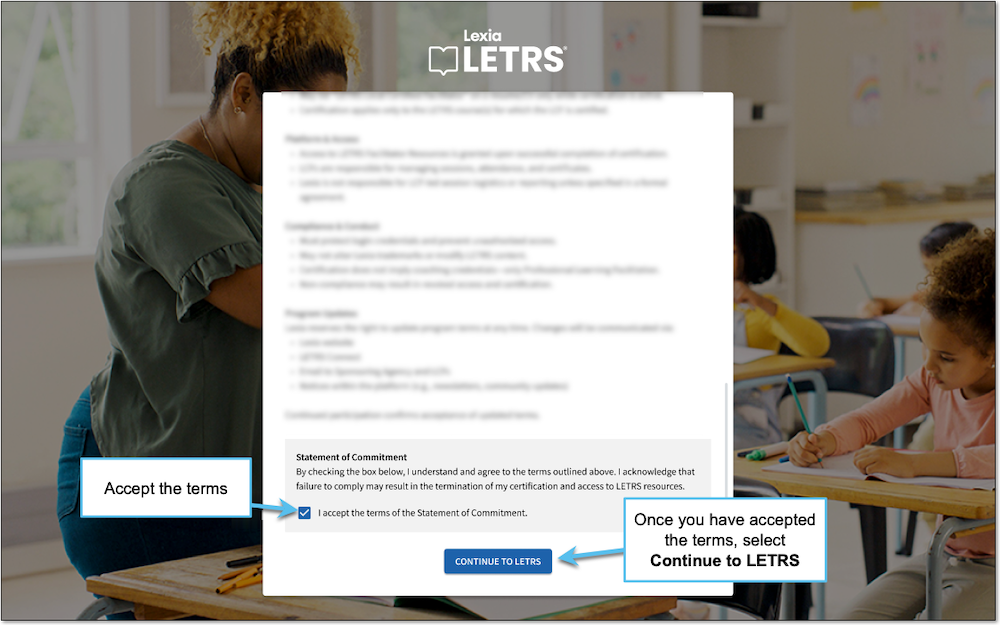
Accepting the Statement of Commitment is mandatory, and you will only be able to access LETRS online materials once you have accepted the terms.
The previous process for accepting the Statement of Commitment involved signing and returning a document via email. Please note that this is no longer the case.
The Statement of Commitment must be accepted directly on the LETRS online platform.