For LETRS Course Managers: How do I view if a Local Certified Facilitator has completed their Statement of Commitment?
For LETRS Course Managers: How do I view if a Local Certified Facilitator has completed their Statement of Commitment?
Overview
Lexia® LETRS® local certified facilitators are required to annually agree to the Statement of Commitment in order to maintain their certification.
This article explains how Course Managers can check if a LETRS facilitator has completed their Statement of Commitment.
Applies to: LETRS Course Managers who have LETRS local certified facilitators in their implementation.
How do I see if a LETRS facilitator has completed their Statement of Commitment?
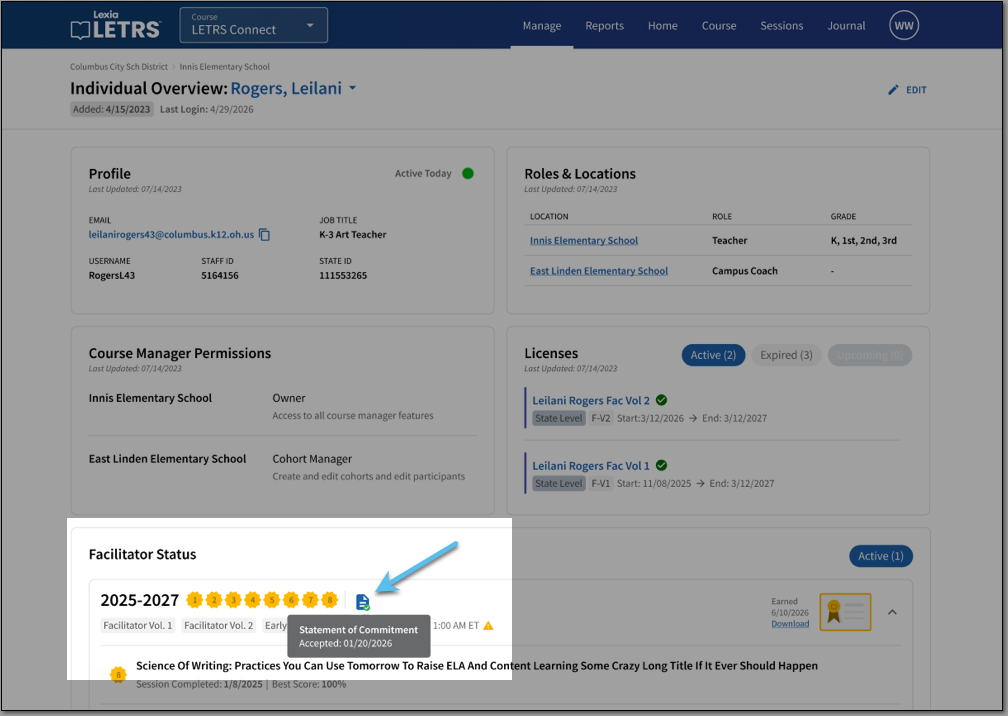
Verify whether a facilitator has completed their Statement of Commitment on their Individual Overview page:
-
On the LETRS online platform, select Manage and select Licenses from the dropdown menu.
-
Select Participants.
-
Select the name of the facilitator to view their Individual Overview.
-
On the facilitator's Individual Overview page, refer to the Facilitator Status section.
-
If the facilitator has completed their Statement of Commitment, you will see an icon of a piece of paper with a check mark next to their completed Connect sessions. Hover your cursor over the icon to see the date the Statement of Commitment was completed.