

How do I log in to Lexia Community Center with Clever?
How do I log in to Lexia Community Center with Clever?
Overview
Lexia Community Center is an online hub where educators can ask questions about Lexia programs, find answers, and engage with peers. Logging in to Community grants full access to customer-exclusive content and resources for supporting students.
This article explains how to log in to Community from a Clever dashboard.
Applies to: Staff who log in to myLexia using single sign-on (SSO) with Clever.
Does not apply to: Staff who log in to myLexia manually with a username and password.
How do I log in to Community with Clever SSO?
-
From your Clever dashboard, select the myLexia icon.
-
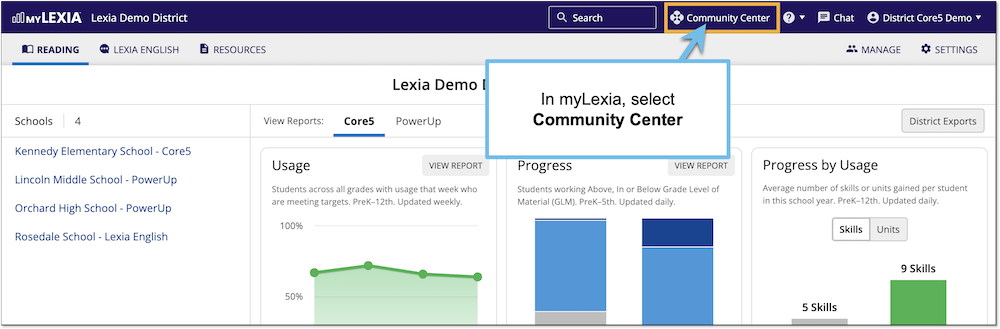
From your myLexia home page, select Community Center.
-
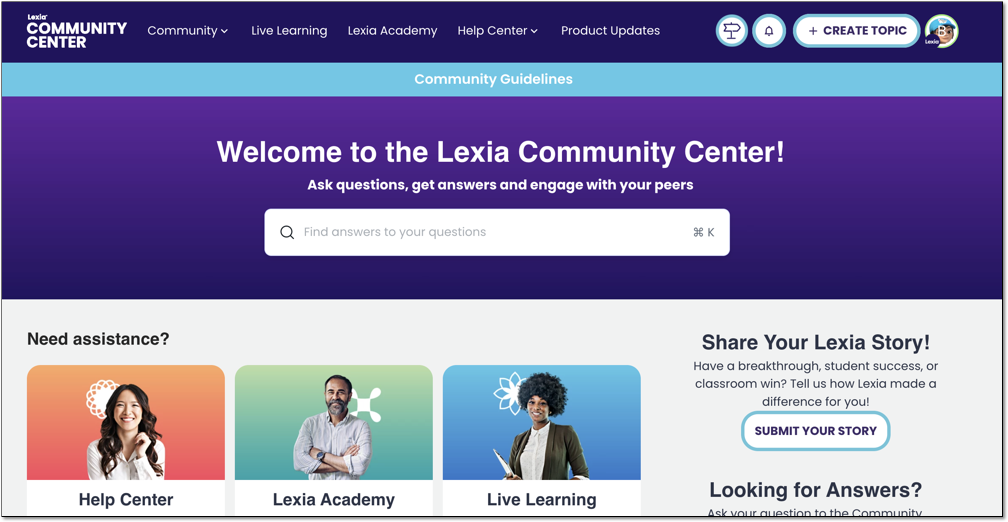
You should be logged in and will see the Community Center homepage.
If you follow these steps and are still unable to log in to Community, please reach out to Lexia Customer Support for further assistance.